
What the planner does
The planner turns a handful of inputs into a complete, checkable trade plan: how many units to trade for your chosen risk, what you stand to lose at your stop and gain at your target after fees, the break-even win rate that implies, and whether the margin fits your account. The safety check then lists specific conditions that deserve a second look.
Formulas
Risk amount = Balance × Risk%Loss per unit = |Entry − Stop| + Fee% × (Entry + Stop)Position size = Risk amount ÷ Loss per unitGain per unit = |Target − Entry| − Fee% × (Entry + Target)Net reward:risk = Gain per unit ÷ Loss per unitBreak-even win rate = Loss per unit ÷ (Loss per unit + Gain per unit)Margin = Position size × Entry ÷ LeverageFees are a percentage of position value charged once on entry and once on exit. With the fee at zero these collapse to the formulas in the Position Size Calculator, and the planner returns the same size.
Worked example
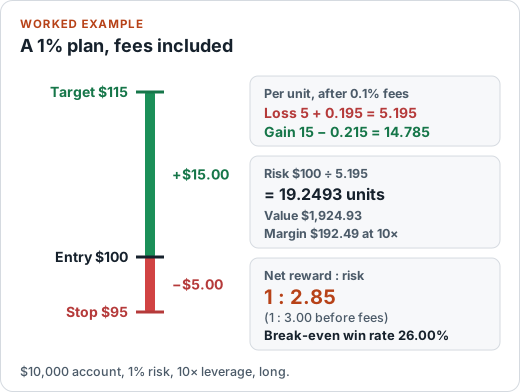
Balance 10,000, risk 1%, long at 100 with a stop at 95 and a target at 115, fees of 0.1% per side, leverage 10×.
- Risk amount = 100.00. Loss per unit = 5 + 0.001 × (100 + 95) = 5.195
- Position size = 100 ÷ 5.195 = 19.2493 units, a position value of 1,924.93
- Gain per unit = 15 − 0.001 × (100 + 115) = 14.785; net gain at target = 284.60
- Net reward:risk = 14.785 ÷ 5.195 = 1 : 2.85 (1 : 3.00 before fees)
- Break-even win rate = 5.195 ÷ (5.195 + 14.785) = 26.00%; margin = 1,924.93 ÷ 10 = 192.49
No flags are raised for these inputs. Change the risk to 6% and the check flags it as high; move the stop above entry on a long and the planner refuses the plan and says why.
What the Safety Check looks for
- Risk per trade above 2% (caution) or 5% (high), since a short losing streak can then cause serious drawdown.
- Direction errors: a stop on the wrong side of entry for the chosen direction, or a target on the wrong side.
- Net reward-to-risk below 1:1, or a target that produces no gain after fees.
- Costs: no fees entered, or fees taking a large share of the reward.
- Margin: required margin above the balance or above half of it, very high position value relative to the account, or leverage not entered.
These are rules of thumb, not trading rules. The thresholds are conventional guidelines, not requirements, and a flag-free plan still carries market risk, gap risk and execution risk.
How to use it
- Enter your balance, the percentage you are willing to lose, direction, and entry, stop and target prices.
- Add fees and leverage if you know them. The more complete the inputs, the more the check can verify.
- Read the flags, then compare alternatives in the scenario table: a wider stop, a different target or a smaller risk.
- Print or copy the audit card to keep a record. Saving to the device is optional.
Saving, exporting and privacy
Nothing you type is transmitted by the planner. If you choose to save a plan, it is stored in your browser's local storage under this site only, up to 50 plans. You can delete single plans, delete everything, or export to CSV. Because it lives in your browser, it won't follow you to another device or survive clearing site data. Do not save anything you would not want another person with access to this device to see.
Assumptions and limitations
- Fills happen exactly at your entry, stop and target prices. Real fills include spread and slippage, and stops can gap.
- Fees are a single percentage of position value per side. Fixed commissions, swaps and funding are not included.
- One instrument, one currency. It does not convert pip values or contract sizes. Use the Pip Value Calculator for that.
- Educational use only. It is not personal financial advice.
FAQ
Does the Safety Check tell me whether a trade is safe?
No. It flags specific, checkable conditions in the numbers you entered: risk size, stop direction, net reward-to-risk, missing costs and margin. A trade with no flags can still lose money. Markets can gap through stops and the tool cannot see your broker, liquidity or news.
Why is the position smaller than in the basic Position Size Calculator?
This planner includes fees in the loss at your stop. The loss per unit is the price distance plus the fees on entry and exit, so the same risk amount buys slightly fewer units. With the fee set to 0 the result is identical to the Position Size Calculator.
Where is my saved history stored?
Only in your own browser's local storage on this device, and only after you press “Save this plan to this device”. It is not sent to SOFTYTOOLS or anyone else. Clearing your browser data, using private browsing or switching device removes or hides it, and you can delete it yourself at any time below.
Can I print or save the audit card as a PDF?
Yes. Use “Print / Save as PDF” and choose Save as PDF in your browser's print dialog. You can also copy the text or download it as a .txt file.
Do I need to enter leverage?
Only if you want a margin check. Without it the planner still sizes the trade, and notes that margin could not be checked.